$249/moreference plan price
Type AI Video Model
Benefit Unlimited video generation
Input Text / Image → Video
Cycle credits 25,000 credits
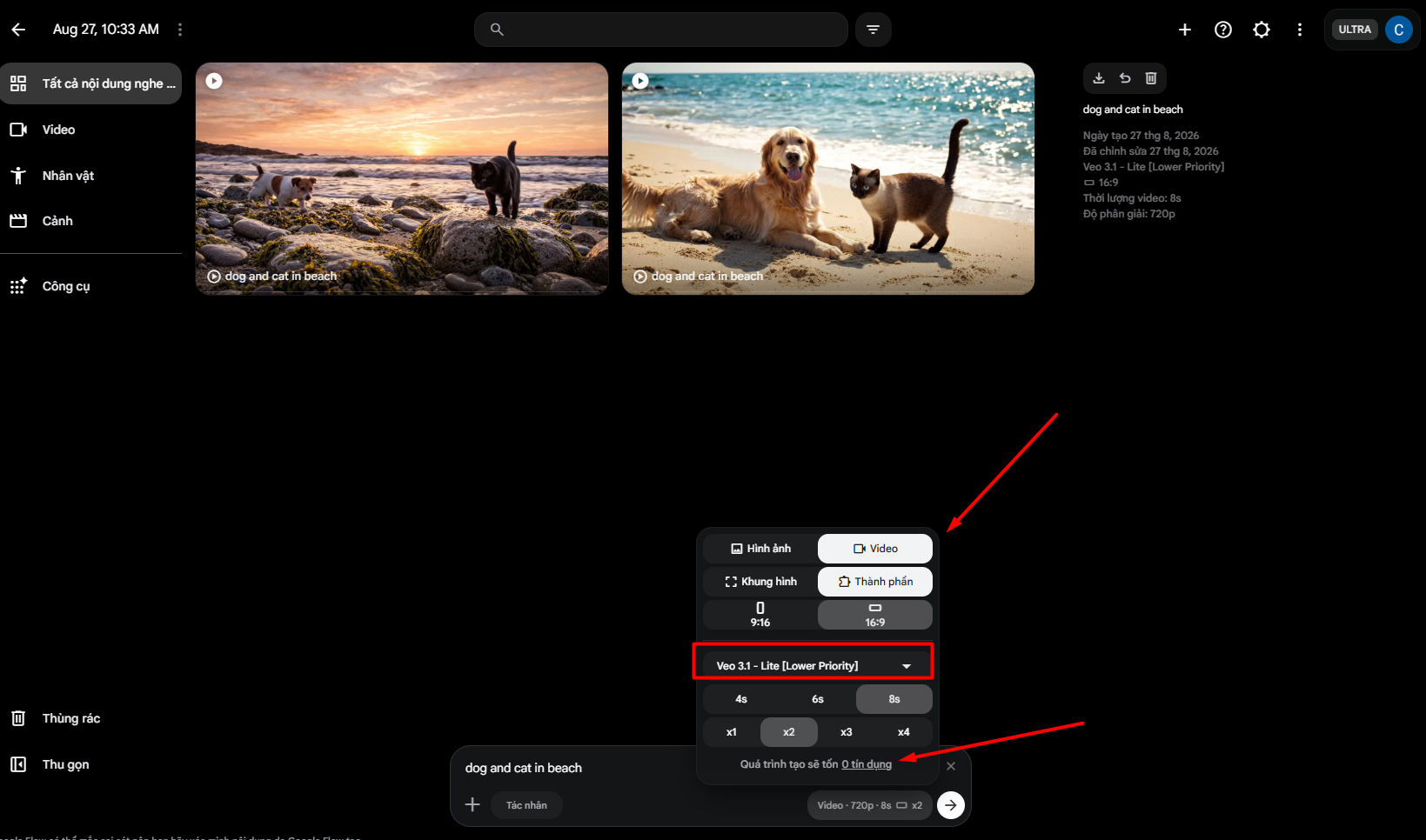
Key benefit: choose Veo 3.1 - Lite [Lower Priority] to generate video with 0 credits . Other models/features may consume credits.
How to access: Tools Ngon App → Veo 3 Ultra → Veo 3.1 - Lite [Lower Priority]
Usage Guide
Select the Lower Priority model when you want unlimited generation without spending credits.
Click image to view full size Video Guide · Coming soon Copy link
Kalodata Enterprise Global Affiliate & Marketing
$148/moreference plan price
Search Unlimited
Shops/Creators Unlimited / search
Detail pages Unlimited / day
Data range 365 days
Analyze TikTok products, shops and creators across markets within Enterprise Global coverage.
How to access: Tools Ngon App → Kalodata Enterprise Global
Usage Guide
Sign in from Tools Ngon and use Kalodata according to the Enterprise Global benefits listed above.
Image Guide · Coming soon
Video Guide · Coming soon Copy link
$55/moreference platform price
Type AI Video Model
Platform Freepik (Magnific)
Benefit Unlimited video generation
Input Text / Image → Video
Important: Kling 2.5 AI is a model inside Freepik (Magnific) , not a separate app/login.
How to access: Tools Ngon App → Freepik (Magnific) → Kling 2.5 AI
Usage Guide
Watch the video to see where the model is located and how to use Kling 2.5 in unlimited mode.
Image Guide · Coming soon
Watch Video Guide Copy link
$55/moreference platform price
Type AI Video Model
Platform Magnific Premium+
Benefit Unlimited video generation
Input Text / Image → Video
Seedance 5.0 Pro is an AI Video model available through Magnific Premium+.
How to access: Tools Ngon App → Magnific Premium+ → Seedance 5.0 Pro
Usage Guide
Use the model from within Magnific Premium+.
Image Guide · Coming soon
Video Guide · Coming soon Copy link
Magnific Premium+ Design & Editing
$55/moreference plan price
Plan Premium+
Credits 45,000 / refill
Refill 4 times / month
Models Kling · Seedance · Hailuo · Wan · Ideogram
Credits are refilled according to the current schedule.
How to access: Tools Ngon App → Magnific Premium+
Usage Guide
Use models and credits according to the benefits shown above.
Image Guide · Coming soon
Video Guide · Coming soon Copy link
$30/moreference plan price
Plan Standard
Fast generations 15 hours
Relax Mode Unlimited
After Fast Keep generating in Relax
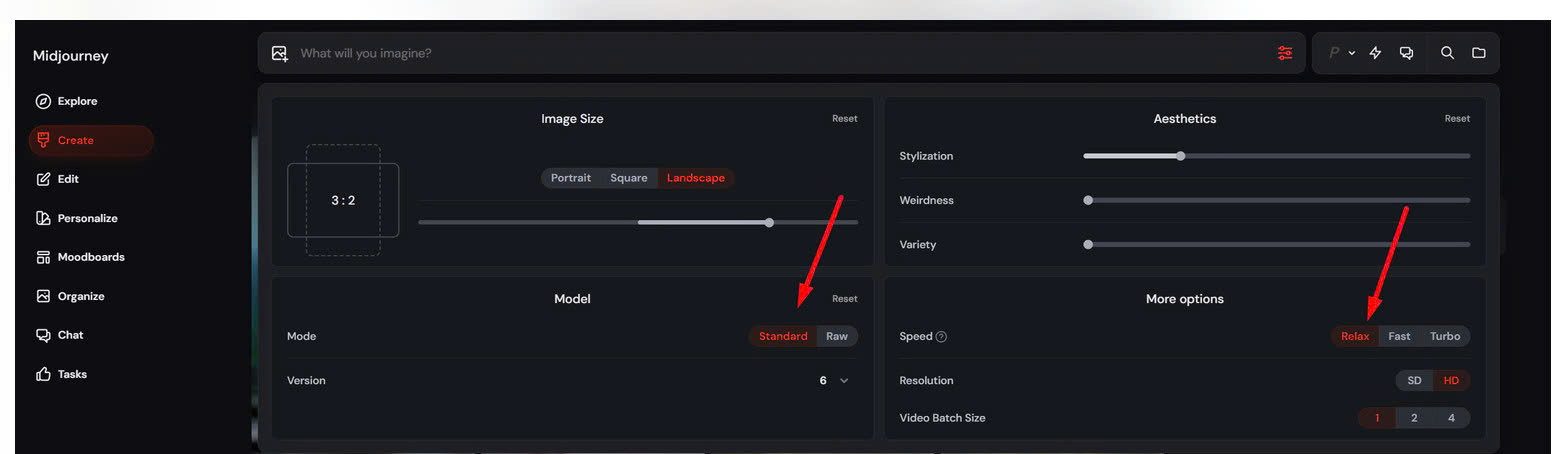
Benefit: Tools Ngon provides Midjourney Standard. After the 15-hour Fast allowance is used, you can continue creating images in Relax Mode without consuming Fast GPU time.
How to access: Tools Ngon App → Midjourney → Create
Usage Guide
When Fast Time runs out, choose Mode: Standard and Speed: Relax , then continue generating images normally.
Click image to view full size Video Guide · Coming soon Copy link
$30/moreference plan price
Plan Premium
Fast tokens 25,000
Relaxed Mode Unlimited Images
Fast use Image & Video
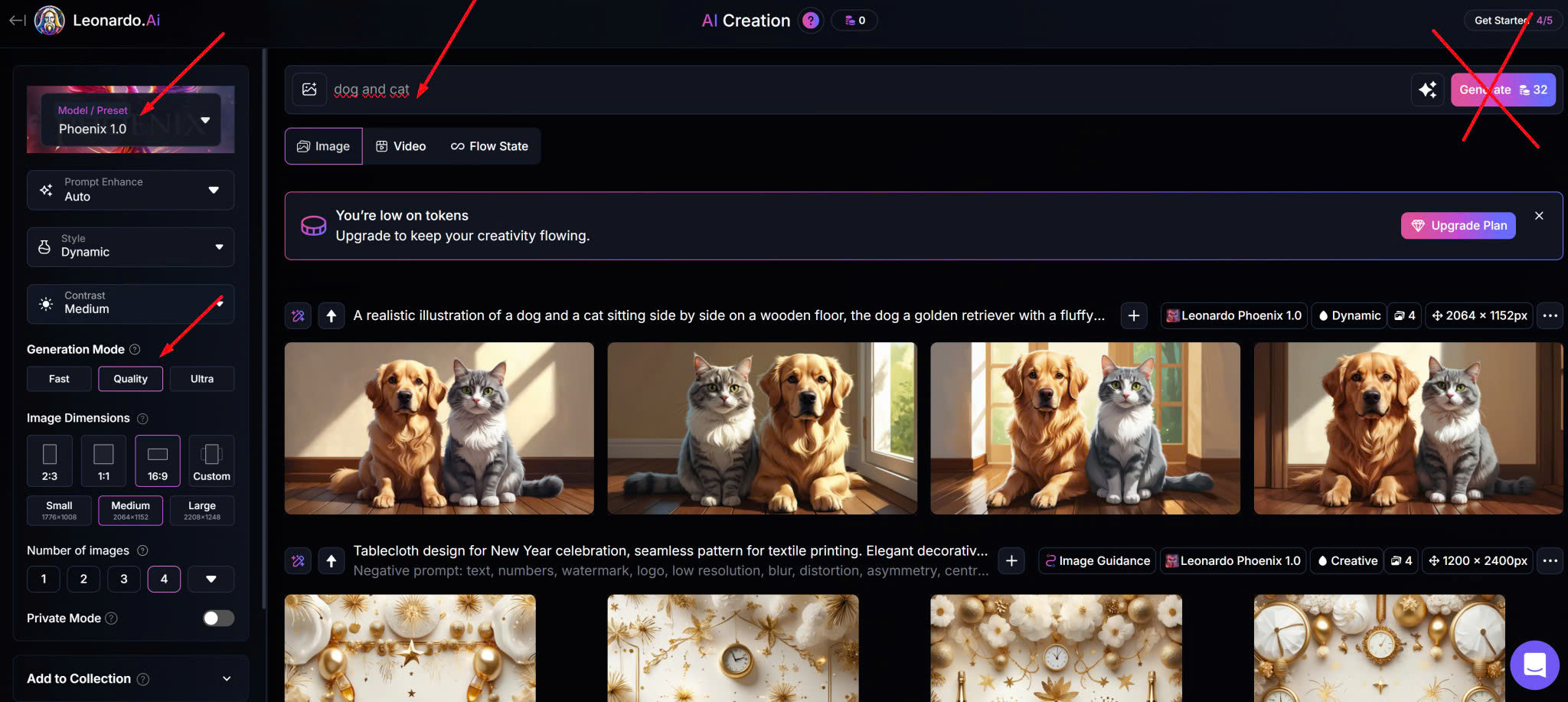
When fast tokens run out, switch to a Relaxed model to continue generating images without quantity limits.
How to access: Tools Ngon App → Leonardo AI
Copy link
$20/moreference plan price
Plan Plus
Models Current Plus models
Access Shared Combo
Use cases Chat · Content · Research
Model access follows the current ChatGPT Plus plan.
How to access: Tools Ngon App → ChatGPT Plus
Usage Guide
Sign in through Tools Ngon and use the models available under the current Plus plan.
Image Guide · Coming soon
Video Guide · Coming soon Copy link
$30/moreference plan price
Plan Pro
Quota Per current plan
Access Shared Combo
Use cases Chat · Content · Research
Quota and models follow the current Pro plan.
How to access: Tools Ngon App → Claude Pro
Usage Guide
Sign in through Tools Ngon and use Claude according to the current Pro plan quota.
Image Guide · Coming soon
Video Guide · Coming soon Copy link
$19/moreference plan price
Plan Pro
Quota Per current plan
Access Shared Combo
Use cases Chat · Research
Benefits follow the current Gemini Pro plan.
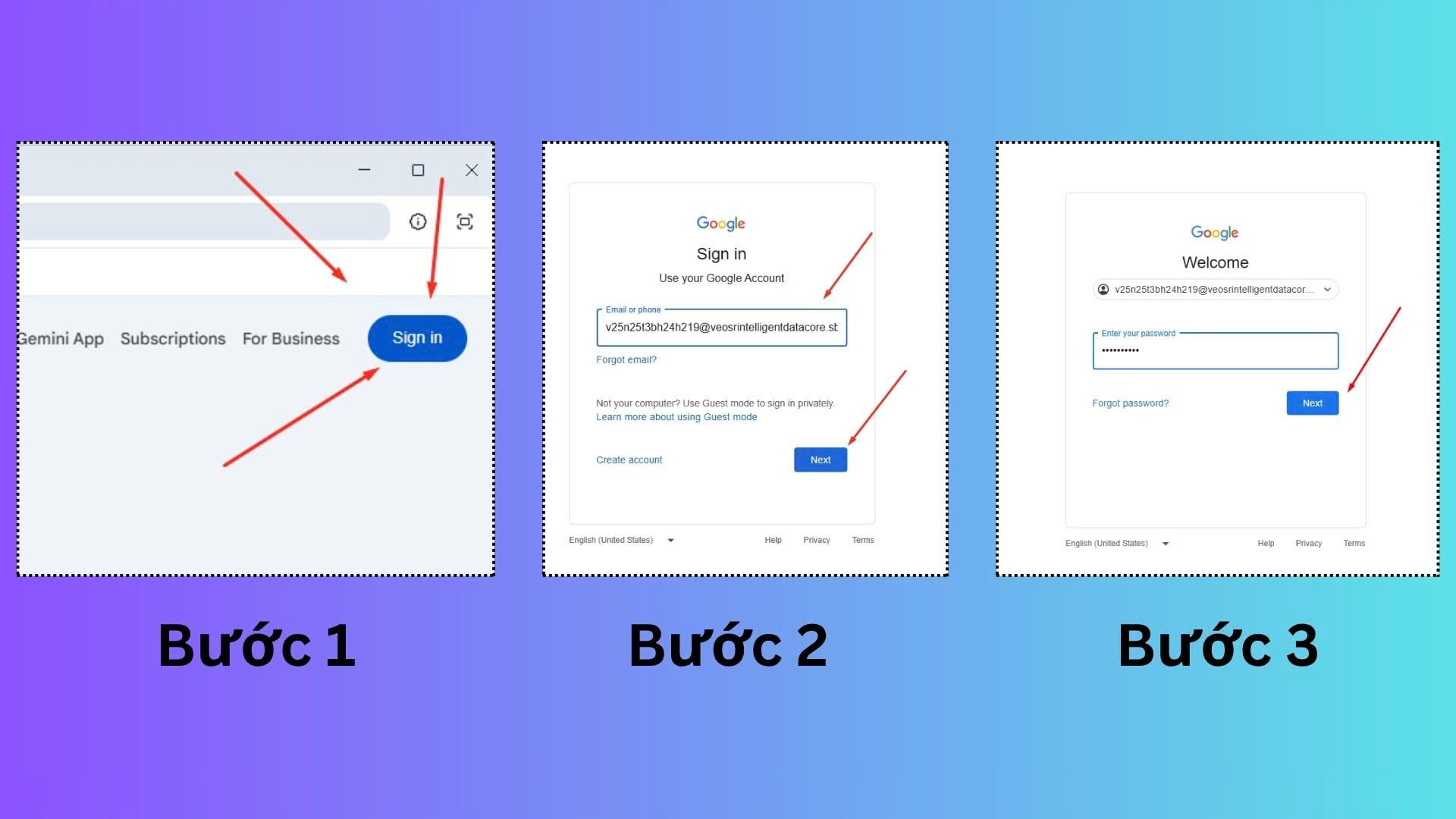
How to access: Tools Ngon App → Gemini Pro → Sign in
Copy link
$30/moreference plan price
Plan SuperGrok
Quota Per current plan
Access Shared Combo
Use cases Chat · Research
Benefits follow the current SuperGrok plan.
How to access: Tools Ngon App → SuperGrok
Usage Guide
Use SuperGrok according to the current plan benefits.
Image Guide · Coming soon
Video Guide · Coming soon Copy link
$249/moreference platform price
Models Pro · 2 · Lite
Platform Veo 3 Ultra
Quota Per Veo account
Included Combo Master
Nano Banana is a model inside the Veo 3 Ultra ecosystem, not a separate app/login.
How to access: Tools Ngon App → Veo 3 Ultra → Nano Banana
Usage Guide
Use the model from inside Veo 3 Ultra.
Image Guide · Coming soon
Video Guide · Coming soon Copy link
$55/moreference platform price
Type AI Video Model
Platform Magnific Premium+
Benefit Unlimited video generation
Input Text / Image → Video
Hailuo AI is an AI Video model inside Magnific Premium+.
How to access: Tools Ngon App → Magnific Premium+ → Hailuo AI
Usage Guide
Use Hailuo from within Magnific Premium+.
Image Guide · Coming soon
Video Guide · Coming soon Copy link
$55/moreference platform price
Type AI Video Model
Platform Magnific Premium+
Benefit Unlimited video generation
Input Text / Image → Video
Wan AI is an AI Video model inside Magnific Premium+.
How to access: Tools Ngon App → Magnific Premium+ → Wan AI
Usage Guide
Use Wan from within Magnific Premium+.
Image Guide · Coming soon
Video Guide · Coming soon Copy link
$55/moreference platform price
Platform Magnific Premium+
Credits Magnific AI Credits
Refill Per Magnific schedule
Included Combo Master
Ideogram is an AI Image model inside Magnific.
How to access: Tools Ngon App → Magnific Premium+ → Ideogram
Usage Guide
Use Ideogram from within Magnific Premium+.
Image Guide · Coming soon
Video Guide · Coming soon Copy link
Suno Premium Voice & Music
$30/moreference plan price
Credits 10,000 / refill
Refill 4 times / month
Potential Up to 40,000 added
Access Shared Combo
Credits are added according to the current refill schedule.
How to access: Tools Ngon App → Suno Premium
Usage Guide
Use Suno according to the displayed credits and refill schedule.
Image Guide · Coming soon
Video Guide · Coming soon Copy link
$19/moreference plan price
Plan VIP
Credits 250,000 / refill
Refill 4 times / month
Potential Up to 1,000,000 added
Credits are added according to the current refill schedule.
How to access: Tools Ngon App → Vbee VIP
Usage Guide
Use Vbee according to the VIP plan credits and current refill schedule.
Image Guide · Coming soon
Video Guide · Coming soon Copy link
Canva Education Design & Editing
$16/moreference plan price
Plan Education
Access Added to class/team
Workspace Team access
Included Combo Master
You are added to a Canva Education class/team.
How to access: Tools Ngon App → Canva Education
Usage Guide
Use Canva through the assigned Education team/class access.
Image Guide · Coming soon
Video Guide · Coming soon Copy link
CapCut Pro Design & Editing
$20/moreference plan price
Plan Pro
Access Current access method
Use cases Editing · Effects
Included Combo Master
Access follows the current CapCut Pro setup in Combo Master.
How to access: Tools Ngon App → CapCut Pro
Usage Guide
Use CapCut Pro according to the current access method provided in Tools Ngon.
Image Guide · Coming soon
Video Guide · Coming soon Copy link
vidIQ Boost Affiliate & Marketing
$19/moreference plan price
Plan Boost
Use case YouTube SEO
Research Keyword · Trend · Competitor
Access Shared Combo
Quota follows the current Boost plan.
How to access: Tools Ngon App → vidIQ Boost
Usage Guide
Use vidIQ Boost for YouTube SEO and research according to the current plan quota.
Image Guide · Coming soon
Video Guide · Coming soon Copy link
No matching item found.

 Click image to view full sizeVideo Guide · Coming soon